
An ACH prenote is a zero-dollar test entry that checks whether a routing number, account number, and account type are valid before real money moves. Under Nacha rules, you wait a minimum waiting period after sending one before pushing a live payment. The catch: a clean prenote confirms the account exists, not that your vendor or employee actually owns it.
TL;DR:
- ACH prenotes confirm that the routing number exists, the account number is valid and open, and the account type matches, but do not verify account ownership.
- A three banking day wait is required after sending a prenote before initiating a live ACH payment, with delays possible due to weekends, holidays, and cutoff times.
- Return codes such as R03, R04, and R20 specify specific issues with account details, but no response indicates the account is likely correct.
- Pairing prenotes with instant name-to-account verification reduces ownership risks, especially for new vendors, large payments, or recent account changes.
- Use prenotes mainly in onboarding processes and couple them with real-time ownership checks to prevent fraud and ensure the correct account holder.
Table of Contents
- What Is ACH Prenotification and How Does It Move Through the Network?
- How Long Do You Have to Wait Before Sending a Live ACH Payment?
- What a Prenote Actually Verifies, and What It Doesn't
- Decoding Common Return Codes: R03, R04, R20, and NOCs
- When Should You Use Prenotes, and What Else Belongs in the Workflow?
- When Prenotes Aren't Enough: Closing the Ownership Gap
- Author Perspective: What AP Teams Should Change in 2026
- How Vopify Complements Your Prenote Process
- Sources
What Is ACH Prenotification and How Does It Move Through the Network?
Prenotification exists because bad account data is expensive to discover after a payroll run has already failed. The process follows the same path as any ACH transaction, just without the dollar amount attached.
Here's the sequence in practice:
- Your company (the originator) formats a prenote entry with a $0.00 amount, using the same routing and account number you plan to use for the real payment.
- Your bank, the Originating Depository Financial Institution (ODFI), batches the prenote and submits it to an ACH operator.
- The ACH operator routes the entry to the Receiving Depository Financial Institution (RDFI), which is the payee's bank.
- The RDFI checks whether the routing number is valid, whether the account number exists, and whether the account type (checking or savings) matches what you submitted.
- If something's wrong, the RDFI sends back a return code or a Notification of Change (NOC). If everything checks out, the RDFI typically does nothing at all.
That silence is the confusing part for AP teams new to this. Under 31 CFR 370.8, a nonresponse from the RDFI within the required window can be treated as an implied warranty that the account number and type were accurate. No response is the system telling you to proceed.
How Long Do You Have to Wait Before Sending a Live ACH Payment?
Nacha requires a minimum three banking day wait after submitting a prenote before you send the corresponding live entry, according to the Nacha developer guide. Banking days exclude weekends and federal holidays, so a Friday submission doesn't clear until the following Wednesday at the earliest.
A few scheduling notes worth building into your calendar:
- If you send a prenote early in the week, the earliest safe live payment date is several days later, assuming no holidays interrupt the window.
- A federal holiday during the waiting period pushes your live date back further.
- Your ODFI's cutoff time matters too. Submit after the daily cutoff and the clock doesn't start until the next processing day.
Pro Tip: Build prenote submission into your vendor onboarding checklist so it happens automatically, days before the first invoice is due, not the day before payroll runs.
Some processors also expect an RDFI response within two banking days if the account information is bad, which gives you a small buffer inside the three-day window to catch problems early.
What a Prenote Actually Verifies, and What It Doesn't
A prenote is a technical check, not a legal one. It confirms the routing number belongs to a real financial institution, the account number is structurally valid and open, and the account type matches. That's the full extent of it.
What it doesn't do is confirm that the name on the account matches the name of your vendor or employee. Nacha does not require RDFIs to run a receiver-name match against the account, and many banks skip that step entirely. That gap is exactly how account substitution fraud works: someone intercepts an onboarding email, swaps in their own account number, and your prenote comes back clean because the account itself is perfectly valid. It's just not the account you intended to pay.
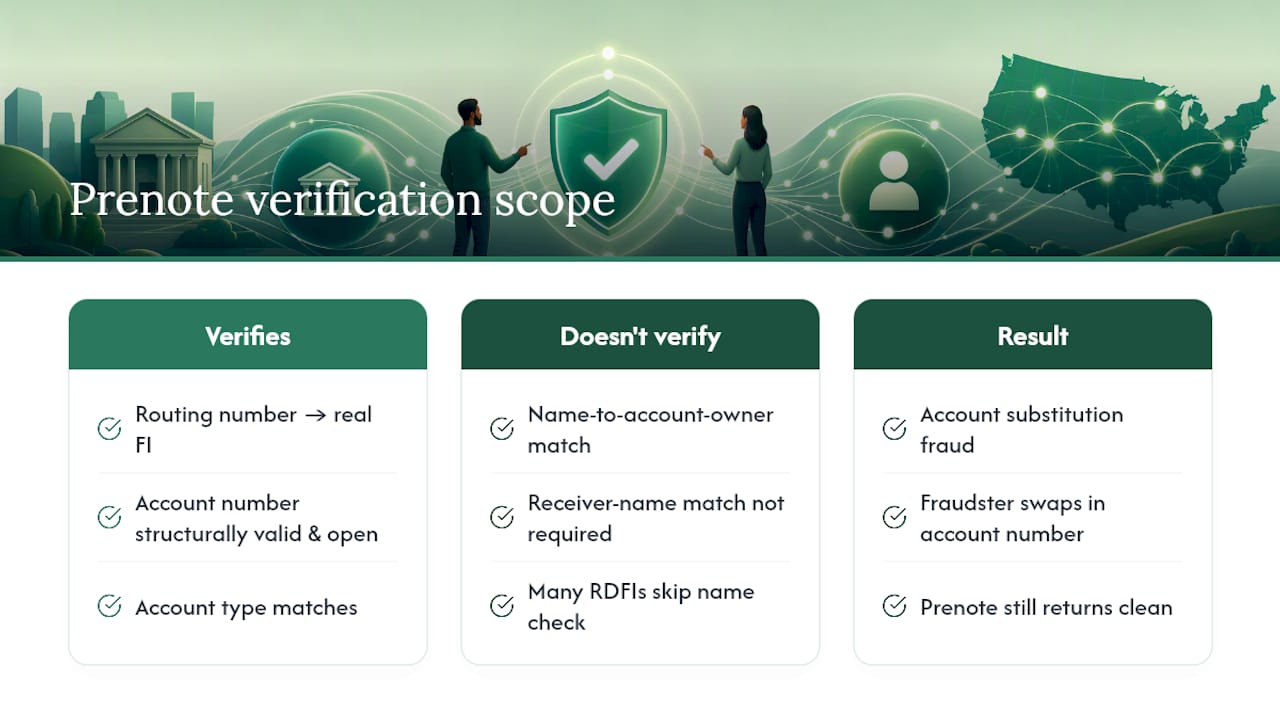
This is why prenotes catch typos and dead accounts reliably but offer weak protection against a deliberate substitution by someone who already has a working account number to plug in.
Decoding Common Return Codes: R03, R04, R20, and NOCs
When a prenote comes back instead of staying silent, the return code tells you exactly what to fix. The most common ones AP teams run into:
- R03 (No Account/Unable to Locate Account): the account number doesn't match any account at that institution. Usually a transposed digit or an account that was closed.
- R04 (Invalid Account Number Structure): the account number doesn't follow the format that bank uses. Double-check for missing or extra digits.
- R20 (Non-Transaction Account): the account can't accept ACH transactions at all, which happens with some savings or restricted accounts.
A Notification of Change is different from a return. It means the entry would have gone through, but something needs correcting, like an updated routing number after a bank merger. NOCs aren't rejections; they're instructions.
Pro Tip: Treat every return or NOC as a hard stop on live payments until resolved. Pause the payment, contact the payee directly through a verified channel (not the email that sent the new bank details), get corrected information, and resubmit a fresh prenote before releasing funds.
When Should You Use Prenotes, and What Else Belongs in the Workflow?
Prenotes earn their place in three recurring scenarios: onboarding a new vendor, processing an employee's bank change, and setting up any recurring payment like payroll or a lease. Anywhere you're about to send money on a schedule to an account you haven't paid before, a prenote is cheap insurance against a bounced payment.
A workable onboarding checklist looks like this:
- Confirm your ODFI's specific prenote requirements. Some banks still mandate prenotes even though Nacha treats them as optional, per bank origination guides.
- Require a signed ACH authorization form from every new payee before the first prenote goes out.
- Log the submission date and set a system reminder for the three-day release window rather than relying on someone remembering.
- Route any return or NOC into a dedicated exception queue instead of a shared inbox.
- For anything involving real ownership risk, pair the prenote with a second verification method.
Pro Tip: Speed and assurance pull in opposite directions. A prenote alone is fast but only checks the account's technical validity. If the payment is large, new, or came through an email that changed banking details, slow down and add an ownership check before the first live dollar moves.
When Prenotes Aren't Enough: Closing the Ownership Gap
Prenotes were built for a slower, batch-based era of ACH. They tell you an account is real. They don't tell you who's sitting behind it, which is exactly the gap that's pushed treasury and compliance teams toward pairing prenotes with instant verification.
Instant name-to-account verification checks the payee's name against the account itself, in real time, closing the blind spot a prenote leaves open. A practical hybrid workflow looks like this:
- Run the prenote for technical validation of routing, account number, and account type.
- Run an instant name-to-account check before releasing the first live payment, especially for new vendors or any account change tied to an email request.
- Reserve the three-day prenote wait for lower-risk, recurring payments where the payee relationship is already established.
Vopify has processed more than 10,000 verifications with sub-two-second response times, matching names against IBANs across 20 Eurozone countries, which gives U.S. finance teams a sense of how fast an ownership check can run compared to the multi-day prenote cycle.
Author Perspective: What AP Teams Should Change in 2026
My honest read: most fraud losses in ACH payments don't come from bad account numbers. They come from good account numbers attached to the wrong person. Pair prenotes with an instant ownership check for anything new, large, or recently changed, and tighten internal controls around who can approve a vendor bank change in the first place. Continuous monitoring beats a one-time check every time.
— David
How Vopify Complements Your Prenote Process
Prenotes tell you an account is technically valid. They don't tell you who owns it, and that's the exact gap Vopify was built to close. Vopify checks a payee's name against their account instantly, in under two seconds, so you're not waiting three banking days to find out the name doesn't match.
Before you add any verification tool to your stack, run it against a short checklist: does it cover the countries and account types your vendors actually use, how fast is the response, does it fit a pay-as-you-go or subscription model that matches your volume, and does it hold up against current compliance requirements? Vopify's IBAN and bank account verification covers SEPA countries plus India, Indonesia, South Korea, and Alipay in China, with results delivered through a dashboard so your team sees a match or a mismatch immediately, not three days later.
If your onboarding process still leans entirely on prenotes and a voided check, that's the exact scenario worth fixing first. Check Vopify's Verification of Payee service and run a payee through it before your next vendor payment goes out.
Sources
- How ACH works — Nacha developer guide
- Code of Federal Regulations — 31 CFR 370.8
- What is a prenote in the ACH process? — LegalClarity
- 2024 Corporate User ACH Origination Electronic Guide — Cornerstone Bank