
A name-to-IBAN check (also called Verification of Payee, or VoP) confirms in real time whether the payee name a payer enters actually matches the name tied to the destination IBAN, returning a standard outcome of Match, Close Match, No Match, or Not Applicable. Vopify runs this check in under two seconds. Built correctly into AP workflows, it catches misdirected payments and fraud before money leaves the account, using EPC-defined match codes as the backbone of the decision.
TL;DR:
- Name-to-IBAN verification must handle formatting issues like legal suffixes and punctuation to reduce false Close Match results.
- Running real-time checks before payments minimizes errors and fraud risks by gating high-value transfers instantly.
- An appropriate threshold for auto-approval should be based on payment value, not vendor history, and reviewed quarterly.
- All response codes, especially Close Match and No Match, require documented actions and manual review for exceptions.
- The system's speed and geographic coverage, including non-SEPA markets, make real-time gatekeeping feasible at scale.
Table of Contents
- How Name Matching Algorithms Work for Payee Verification
- Building a VoP Check Into Your Payment Workflow
- What to Do When You Get Match, Close Match, No Match, or Not Applicable
- Integration Checklist for AP and Treasury Teams
- Vopify in Practice: What Real Deployment Looks Like
- What Most Teams Get Wrong the First Time Around
- Put Real-Time Payee Verification Into Your AP Workflow
- Sources
How Name Matching Algorithms Work for Payee Verification
A name matching check takes two required inputs: the payee name your supplier record or invoice supplies, and the IBAN you intend to pay. Some implementations accept a third optional identifier, like a VAT number or LEI, when the payer has one on file. The receiving bank checks that name against the actual account holder on record and sends back a structured response rather than a plain yes or no.
The Verification of Payee scheme defines four standard outcomes:
- Match (MTCH): the name and IBAN correspond exactly, or close enough that the scheme treats it as a full match.
- Close Match (CMTC): the account exists but the name differs slightly, and the response includes a
matchedNamefield showing what the bank actually has on file. - No Match (NMTC): the name does not correspond to the account holder on that IBAN.
- Not Applicable (NOAP): the check could not be performed, often because the receiving bank doesn't support VoP or the account type is excluded from the scheme.
One detail AP teams miss early: VoP checks the account record at the responding institution. It is not identity verification in the KYC sense, and it says nothing about who ultimately controls the funds once they land. Formatting also matters more than people expect. Trailing punctuation, legal suffixes like "Ltd" or "GmbH", and inconsistent spacing between the invoice name and the bank's registered name are the most common reasons a legitimate payee triggers a Close Match instead of a clean Match.
Building a VoP Check Into Your Payment Workflow
Where you place the check changes everything about how it performs. Running it at payment initiation, in real time, catches errors before funds move. Running it only during supplier onboarding leaves a gap: nothing stops a compromised or updated bank detail from slipping through on a later invoice run. Most mature AP setups use both, with the real-time check as the last line of defense right before a payment file is released.
Sub-two-second response times are what make real-time gating practical at scale. If a check took ten or fifteen seconds, teams would either batch it overnight (reintroducing the gap) or eat the friction on every single payment run. A near-instant response lets you gate high-value transfers automatically without slowing down the finance team's day.
A workable rollout usually follows this sequence:
- Normalize the payee name first. Strip legal suffixes, standardize punctuation, and match encoding before you send the request, using the same logic outlined in Vopify's guidance on name normalization.
- Set a value-based threshold. Low-value, recurring payments to an already-verified vendor can auto-approve on Match; anything above a defined amount routes to manual review even on Match, and everything routes to review on Close Match or No Match.
- Log every response code, not just the failures, so you have an audit trail showing the system checked every payment, not just the ones that got flagged.
- Review the threshold quarterly against your actual manual-review volume and adjust it if too many legitimate payments are landing in the queue.
Pro Tip: Don't set your Close Match threshold to auto-reject. A Close Match on a supplier that recently changed its legal name (a merger, a rebranding, an LLC-to-corp conversion) is often correct, just not identical text. Route it to a human, not a dead end.
What to Do When You Get Match, Close Match, No Match, or Not Applicable
Each outcome code should map to a specific, pre-written action, not a judgment call made fresh every time.
- Match: release the payment through normal processing, record the match code and the payee name exactly as returned, and store both in the audit log tied to that transaction.
- Close Match: surface the
matchedNamethe bank returned to the AP operator alongside the invoice name. For low-value payments, a quick visual confirmation may be enough. For anything above your risk threshold, require the operator to actively confirm the discrepancy is expected (a name change, a trading name versus a legal name) before release. - No Match: hold the payment. Do not release funds. Contact the payee directly, through a channel you already have on file, not through contact details on the invoice itself, since that's a common fraud vector. Require written confirmation of the correct account before resubmitting.
- Not Applicable: this is the case teams plan for least and regret most. When the receiving bank doesn't support VoP or the account falls outside scheme coverage, you need a fallback: micro-deposit verification, a direct call to the vendor's finance contact, or a short payment delay while someone manually confirms the account. Micro-deposit verification works well here because it confirms account control without needing the receiving bank's participation in a name-matching scheme.
Document every exception. A No Match or Not Applicable that gets overridden without a written reason is exactly the kind of gap an auditor, or a fraud investigator after the fact, will find first.
Integration Checklist for AP and Treasury Teams
Before you commit to a provider or build against an API, confirm it covers the following ground.
API and data requirements:
- Single-call name-plus-IBAN checks for real-time gating, plus bulk upload support for onboarding new vendors in batches.
- Response fields that include the match code, a
matchedNamevalue for Close Match cases, and clear, distinct error codes, not a generic failure message that lumps No Match in with a system timeout.
Where it plugs in:
- Your ERP or AP automation platform, ideally at the point where a payment batch is generated, not after it's already been submitted.
- A dedicated exception-management queue that routes Close Match and No Match results to a human, separate from your standard invoice-approval workflow.
- Your reconciliation process, so verification records tie back to the actual payment file for later audit.
Controls to insist on:
- Retained audit logs with role-based access, so only authorized staff can override a No Match.
- A defined throughput SLA and alerting if No Match rates spike unexpectedly, which can signal either a data quality problem or an active fraud attempt against your vendor master file.
Track a small set of KPIs rather than drowning in dashboards: verification success rate, mean response latency, the percentage of checks landing in manual review, and, over time, the reduction in misdirected or reversed payments. Sub-two-second latency, the benchmark Vopify's platform is built around, is what keeps that manual-review percentage from ballooning as payment volume grows.
Vopify in Practice: What Real Deployment Looks Like
Vopify has processed over 10,000 name-to-IBAN verifications, with response times consistently under two seconds and coverage spanning 20 Eurozone countries plus selected non-SEPA markets. That combination, speed and geographic reach, is what makes real-time gating realistic instead of theoretical for AP teams running payments across borders.
A few capabilities worth knowing about beyond the core Match/No Match check:
- Mule account detection flags accounts showing fraud-risk patterns, layered on top of standard name verification, as detailed in Vopify's case study on real-time payee verification.
- Micro-deposit fallback handles the Not Applicable scenario when a receiving bank doesn't support instant VoP checks.
- Name normalization logic built into the matching engine reduces false Close Match and No Match results caused by formatting differences rather than genuine discrepancies.
Each of these maps directly to a gap in the operational workflow described above: NOAP needs a fallback, Close Match needs cleaner normalization, and No Match needs a fraud lens, not just a formatting explanation.
What Most Teams Get Wrong the First Time Around
The most common rollout mistake is treating a Close Match as a nuisance to route around rather than a signal worth reading. Teams build a rule that auto-approves anything "close enough," and within a few months, they've quietly disabled the one check most likely to catch a legitimately changed account. The second mistake is not instrumenting anything: no logging of match codes, no visibility into how often No Match actually fires, so nobody notices when the rate creeps up until a payment goes to the wrong place.
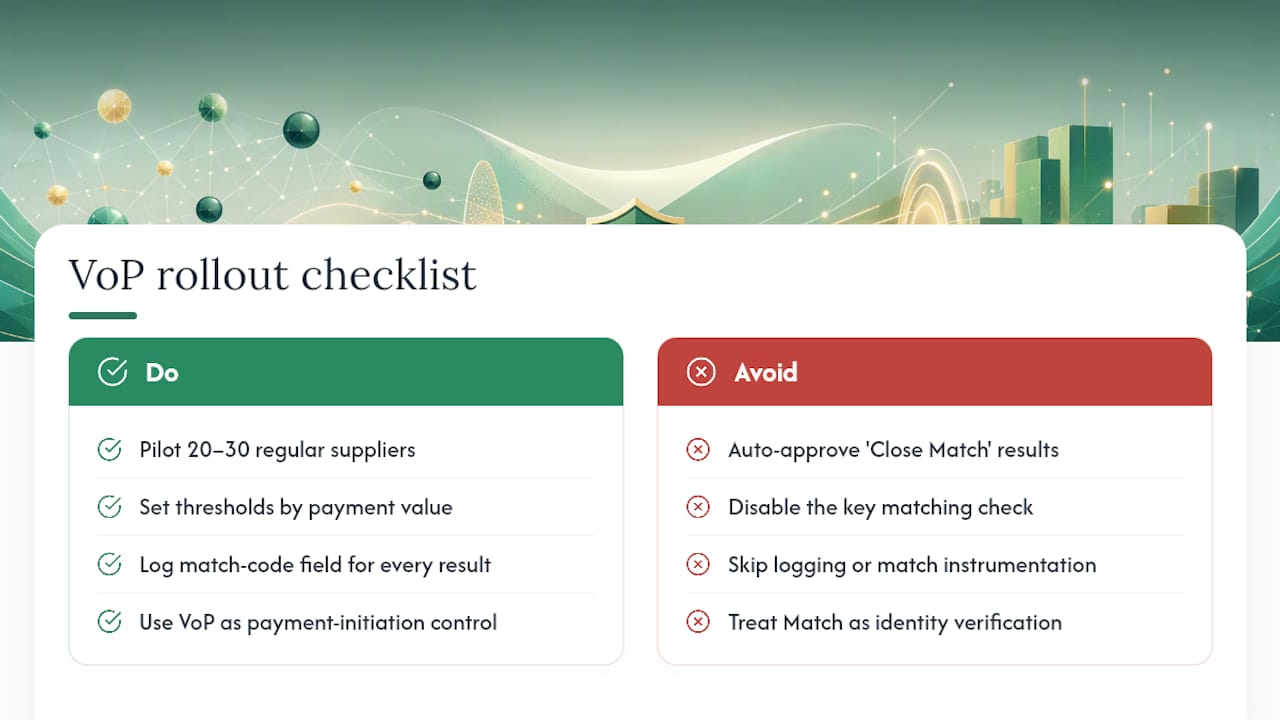
Start with a pilot cohort, twenty or thirty regular suppliers, before rolling out to the full vendor file. Set thresholds by payment value, not by vendor tenure, and always log the matchedName field for later investigation, even on results you don't act on immediately.
The other point worth stating plainly: VoP is a payment-initiation control, not identity verification. Compliance teams that treat a Match result as proof of who they're dealing with are asking the tool to do a job it was never built for. Keep it in its lane, and it's one of the strongest guardrails available against misdirected payments.
— David
Put Real-Time Payee Verification Into Your AP Workflow
Vopify runs the name-to-IBAN check described throughout this article: sub-two-second responses, single or bulk checks, and coverage across SEPA plus selected non-SEPA markets like India and Indonesia. If you're building the integration checklist above into your own stack, the Verification of Payee product page walks through how the matching engine handles Match, Close Match, and No Match outcomes for both individual and business payees.
Finance teams running high supplier volumes tend to start with a bulk CSV check against their existing vendor master file, catching Close Match and No Match cases before they ever reach a live payment run. From there, moving to real-time checks at payment initiation is a smaller step. If you want to see how the match codes and response times hold up against your own vendor list, try Vopify with a sample batch and check the results against what your current process would have caught.