
A complete supplier onboarding checklist covers seven categories: identity and contacts, tax and payment details, compliance certifications, contract terms, system setup, activation steps, and ongoing performance monitoring. Done right, it produces a verified, risk-tiered vendor record ready for payment in a timely manner. Standards like OFAC screening and IRS W-9 collection anchor the compliance layer, while a tool like Vopify closes the one gap most checklists still miss: confirming the bank account actually belongs to the supplier you think you're paying.
TL;DR:
- Automate bank account verification with instant name-to-IBAN matching to prevent fraud and payment delays before issuing the first invoice.
- Implement a risk-tiered checklist that requires only essential documents for low-risk vendors, with deeper scrutiny reserved for high-risk suppliers.
- Assign clear owners, acceptance criteria, and evidence storage for each checklist item to create an auditable, accountable onboarding process.
- Use parallel document collection and screening to reduce onboarding time and avoid bottlenecks caused by sequential tasks.
- Establish a consistent communication plan and escalation rules to handle exceptions promptly and maintain alignment among internal teams and suppliers.
Table of Contents
- What Belongs on Your Supplier Onboarding Checklist
- How Does the Supplier Onboarding Process Actually Flow?
- What Compliance and Verification Checks Actually Matter?
- Setting Up the Vendor Master Without Creating Duplicates
- Which KPIs Tell You Onboarding Is Actually Working?
- Where Should You Automate First?
- How Do You Keep Everyone Aligned During Onboarding?
- What Support Do New Suppliers Actually Need?
- How Should You Document and Retain Onboarding Records?
- What Happens When Onboarding Hits a Snag?
- Practitioner Perspective: Why Payee Verification Belongs Earlier in the Checklist
- Add Instant Payee Verification to Your Onboarding Checklist
- Sources
What Belongs on Your Supplier Onboarding Checklist
Most onboarding failures trace back to one thing: nobody wrote down who owns each check or what "done" looks like. A checklist without an owner and acceptance criteria is just a wish list. Process Street's compliance guidance makes this point directly. An auditable process captures intake context, assigns a named owner to every item, and records the evidence someone will need during a future audit.
Here's the full set, organized the way procurement and AP teams actually use it.
Identity and contacts
- Legal business name and any DBA/trade name
- Registered address and country of incorporation
- Primary point of contact, plus a billing contact if different
- Business registration or entity number
Tax and payment information
- W-9 (US suppliers) or W-8BEN/W-8BEN-E (foreign suppliers)
- Tax ID or EIN
- Remittance instructions and preferred payment method
- Bank account details, verified against the named account holder before the first payment goes out
Compliance and certifications
- Certificate of insurance (general liability, and workers' comp where applicable)
- ISO or SOC 2 certification for suppliers touching sensitive systems
- Industry-specific licenses (health, food, construction, transport)
- ESG or supplier diversity documentation, when your procurement policy requires it
Security and privacy
- Signed data processing agreement (DPA) for any vendor handling customer or employee data
- Security attestation or recent penetration test summary for critical software vendors
- Data handling and retention notes matching your internal policy
Operations and commercial terms
- Signed statement of work or master service agreement
- Pricing schedule and payment terms (net 30, net 60, early-pay discounts)
- Service-level agreements and lead times
- Escalation contacts for delivery issues
Not every supplier needs every item. A one-time graphic designer invoicing $800 doesn't need a SOC 2 report. A logistics vendor moving your inventory across borders does. That's where risk tiering earns its keep: Amazon Business's guidance on vendor relationships recommends centralizing supplier data and applying a risk-based approach so low-risk vendors clear onboarding fast, while critical or high-spend suppliers get the deeper scrutiny they warrant.
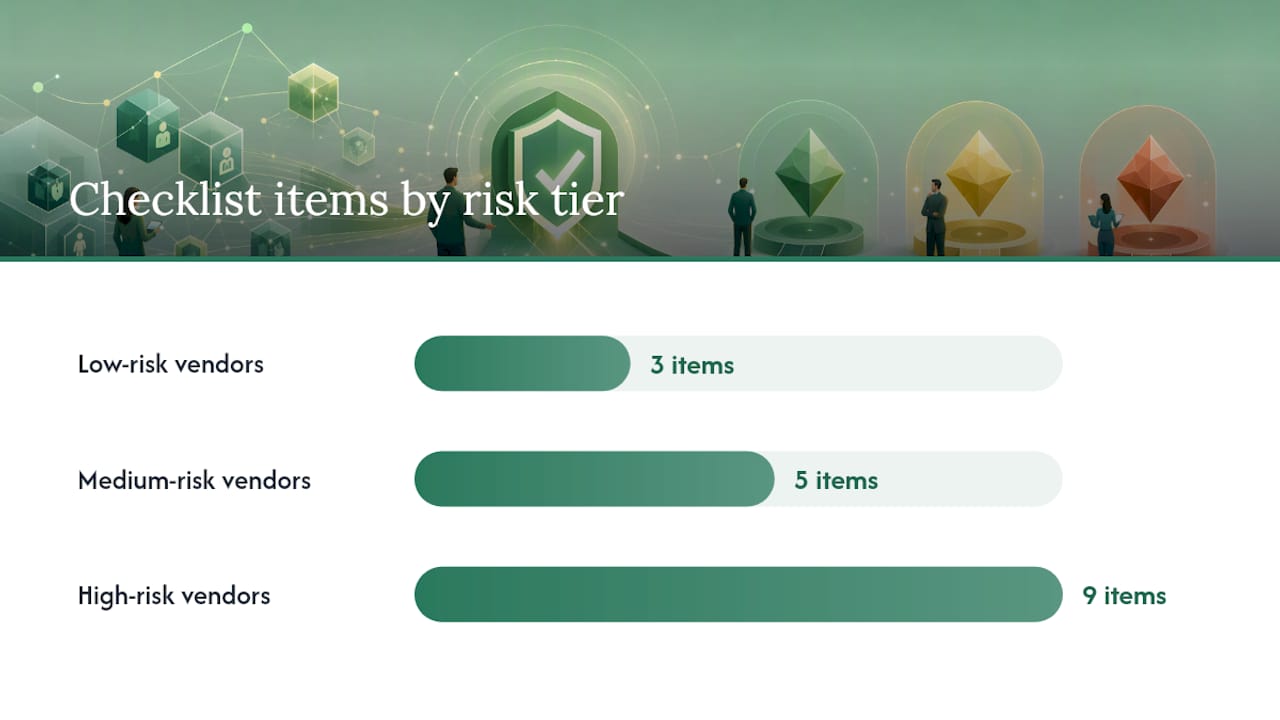
A practical three-tier structure can be used, with low-risk vendors requiring basic identity, tax form, and verified bank details; medium-risk vendors adding insurance certificates and a signed statement of work; and high-risk vendors receiving deeper scrutiny, such as sanctions screening, data processing agreements, security attestations, and beneficial ownership reviews.
Every item on the checklist needs three things attached to it: an owner (procurement, AP, legal, or security), acceptance criteria (what "verified" actually means for this field), and a place to store the evidence. Skip any of the three and the checklist becomes decoration.
Pro Tip: Assign the bank verification step to AP, not procurement. AP is the team that catches the mismatch before the payment run, and they're the ones who'll deal with the fallout if it slips through.
How Does the Supplier Onboarding Process Actually Flow?
The checklist tells you what to collect. The process tells you in what order, and who's waiting on whom. Stripe's onboarding guide breaks it into six recognizable phases: intake and qualification, document collection, compliance verification, contract negotiation, system setup, and activation. Here's how that plays out on the ground.
- Intake. The requester submits business need, expected annual spend, and which systems the new vendor will touch. This single form determines everything downstream, including risk tier.
- Prequalification and risk assignment. Spend level, data access, and country of operation get scored against your tier rules. This step should take minutes, not days, if it's built into an intake form.
- Parallel collection and screening. Here's where most teams waste time by running tasks sequentially that could run side by side. Document collection, sanctions screening, and credit checks can all happen at once instead of waiting in a queue.
- Approval gates. Procurement signs off on commercial terms. Finance approves payment terms and credit exposure. Legal reviews contract language for anything above a set spend threshold. Security signs off only for vendors touching sensitive systems, which keeps low-risk suppliers from getting stuck behind a security queue they don't need.
- Activation. Vendor master entry, ERP or AP system configuration, portal access provisioning, and confirmation of invoice submission instructions to the supplier.
Time expectations vary by tier, but reasonable service-level targets are often set to allow faster completion for low-risk suppliers and longer for high-risk ones, assuming documents arrive promptly. The bottleneck is almost never the checks themselves. It's waiting for a human to notice a document sitting in an inbox.
Moxo's onboarding research backs the parallelization point directly: running document collection alongside automated screening, instead of gating one behind the other, is one of the highest-impact changes a team can make without new software spend.
Pro Tip: Build your intake form so risk tier gets assigned automatically based on spend and country fields. Manual tier assignment is where onboarding backlogs quietly start.
What Compliance and Verification Checks Actually Matter?
Sanctions screening isn't optional paperwork. It's a legal requirement, and the reference point most US finance teams check against is the Treasury's OFAC Specially Designated Nationals list. Run every new supplier's legal name, and any listed beneficial owners, against it before the first invoice gets approved, and keep a timestamped record of the screening result.
For higher-risk suppliers, especially entities with layered ownership structures, pull a corporate registry check to confirm who actually controls the business. A supplier claiming to be a domestic small business but owned by a shell entity in a sanctioned jurisdiction is exactly the scenario screening exists to catch.
Insurance certificates deserve a second look beyond "did they send one." Verify the policy is active by checking the issuing carrier's certificate holder line, not just trusting a PDF someone forwarded. Certificates get forged or expire quietly more often than procurement teams expect.
Data-security evidence matters most for suppliers touching customer records, payment data, or internal systems. A signed DPA plus a recent SOC 2 or ISO 27001 report should be the floor, not the exception, for that category.
Then there's the check almost every checklist gets wrong: bank account verification. Practical AP guidance on validating vendor bank accounts points out that misdirected payments are one of the most common and most preventable failure points in onboarding. Three approaches exist:
- Manual documentation (voided check, bank letter): slow, and easy to forge.
- Micro-deposit verification: adds one to two business days of delay before the supplier can get paid.
- Instant name-to-IBAN matching services: confirm the account holder matches the supplier name in under two seconds, before the first payment leaves.
Escalate immediately, and hold the payment, if a name-to-account check fails or a supplier's registration details don't match what's on the invoice. That mismatch is the single most common signature of business email compromise fraud, and it's cheaper to pause and ask than to claw money back after a wire clears.
Setting Up the Vendor Master Without Creating Duplicates
Duplicate vendor records are the quiet tax every AP team pays for skipping naming conventions. Fix it at intake, not after the fact. Use a consistent legal-name format (no abbreviations, no "Inc" vs "Incorporated" inconsistency), require the tax ID as a mandatory match field, and run a duplicate check against existing records before creating a new vendor number.
Banking and tax data need tighter access controls than the rest of the vendor file. Limit who can view or edit bank details to a small, named group in AP, and log every change with a timestamp and user ID. If your ERP supports field-level permissions, use them here specifically.
Your integration checklist should cover:
- Chart-of-accounts mapping so invoices route to the correct GL code automatically
- Default payment terms pulled from the signed contract, not re-keyed manually
- PO requirement flags (does this vendor need a PO before invoicing, or not)
- Supplier portal access, with clear instructions on invoice submission format and remittance details
Pro Tip: Set automated expiry reminders for insurance certificates and compliance documents 60 days before they lapse, not 60 days after you notice they're gone. A supplier operating on an expired certificate is a liability nobody flagged.
Communicate the go-live date and portal login instructions to the supplier directly, in writing, once activation completes. A vendor who doesn't know how to submit an invoice correctly generates exception tickets for months.
Which KPIs Tell You Onboarding Is Actually Working?
Four metrics catch most onboarding problems before they become expensive ones:
- Time-to-activation: days from intake to a live, payable vendor record
- Invoice exception rate: percentage of invoices from that supplier requiring manual correction
- On-time delivery or service performance: tracked against the SLA signed at onboarding
- Compliance-document currency: percentage of active suppliers with current insurance and certifications on file
Review cadence should match risk tier, not apply uniformly across your vendor base.
| Risk tier | Review cadence | Primary owner |
|---|---|---|
| Low | Annually | AP |
| Medium | Quarterly | Procurement |
| High | Monthly | Procurement + Security |
When a KPI drops, for instance invoice exceptions climbing above your baseline, the fix is usually a conversation with the supplier and a documentation refresh, not an automatic termination. But the record of that conversation belongs in the vendor file, feeding the same scorecard an auditor will eventually ask to see.
Where Should You Automate First?
Automate the tasks that are high-volume and low-judgment before you touch anything that requires a human decision. Tax ID format validation, sanctions list screening, and document expiry alerts fit that description precisely. None of them benefit from a person doing them manually, and all three are exactly where backlogs pile up when nobody automates.
- Standardize intake with a self-service form. A structured supplier portal that collects tax forms, insurance certificates, and bank details up front eliminates the email back-and-forth that stretches onboarding from days into weeks.
- Apply conditional logic by risk tier. Don't ask a $2,000-a-year vendor for the same nine documents you require from a $500,000 supply chain partner. Over-documenting low-risk vendors is the number one reason onboarding feels slow to the business units waiting on it.
- Centralize everything in one system of record. Scattered spreadsheets and email threads are where audit trails go to die.
Precoro's research on onboarding automation backs this sequencing: automating data collection, sanctions checks, and expiry alerts produces measurably faster approvals and stronger governance, without adding headcount.
Documenting the owner and acceptance criteria for every checklist item is what actually converts a checklist from a nice-to-have into an auditable control that survives a real audit.
Pro Tip: Start automation with whichever task generates the most manual rework tickets in the past quarter. That's usually sanctions screening or expiry tracking, and fixing it first gives you a visible win to justify the next automation investment.
How Do You Keep Everyone Aligned During Onboarding?
Onboarding stalls most often not because a check is hard, but because nobody told the right person it was their turn. A short communication plan fixes that before it becomes a pattern.
Assign a single point of contact on your side for each new supplier. That person doesn't have to complete every task personally, but they own answering the question "where are we stuck" at any point in the process. Without a named owner, requests bounce between procurement, finance, and legal with nobody accountable for the delay.
Set expectations with the supplier up front: what documents you need, roughly how long each stage takes, and who to contact with questions. A supplier left guessing will call five different people at your company asking the same thing, which wastes more time than the documentation itself.
Internally, a brief status update at each approval gate, even a simple automated notification, keeps finance and legal from duplicating work or approving something procurement already flagged. For high-risk suppliers pulling in security and legal review, a short kickoff call at intake often saves days later by surfacing objections before documents get collected rather than after.
Close the loop when onboarding completes. Confirm activation to the requester, the supplier, and anyone who approved an exception along the way. That confirmation becomes part of your audit trail, and it's the moment most teams skip.
What Support Do New Suppliers Actually Need?
A supplier who doesn't understand your invoicing rules will generate exception tickets for months, so the fastest fix is teaching them once, clearly, at activation.
Give every new supplier a short reference document, not a lengthy policy manual, covering exactly how to submit an invoice, what fields are required, and where remittance details go. If you're using a supplier portal, a two-minute walkthrough video beats a written manual for most vendors, particularly smaller ones without dedicated AP staff.
Name a single point of contact for supplier questions post-activation, separate from whoever managed intake. Vendors need a channel for "my invoice was rejected" that isn't a black hole. Publish response-time expectations for that channel too. A supplier who waits two weeks for an answer about a bounced invoice starts calling your requester directly, which pulls the business unit back into a process they'd already handed off.
For recurring or high-volume suppliers, consider a brief annual refresher, especially when your tax form requirements or portal changes. A W-9 that's been sitting on file for three years without a check is a small compliance risk that compounds across a large vendor base. The investment here is minor: a template email, a short video, and one clearly staffed inbox. What it buys back is dozens of hours in exception handling nobody budgeted for.
How Should You Document and Retain Onboarding Records?
Every checklist item needs a paper trail, and the paper trail needs a consistent home. Scattered attachments across email threads are the number one reason audits take weeks instead of hours.
Store every piece of onboarding evidence, tax forms, insurance certificates, screening results, signed contracts, in the vendor's file within your system of record, not in individual inboxes. If your ERP or AP platform supports document attachment at the vendor level, use it as the single source of truth rather than a shared drive folder that someone eventually loses track of.
Timestamp every verification step. A sanctions screening result, a bank verification confirmation, an insurance check, all need a date and the name of who performed it. That timestamp is what turns a checklist into evidence during an actual audit, rather than a claim nobody can substantiate.
Set retention periods that match your regulatory obligations, not a guess. Tax documents typically need multi-year retention; insurance certificates only need to be current, with expired versions archived rather than deleted, so you can show the coverage gap never actually existed.
Review your document retention policy annually. Vendor files accumulate outdated versions of contracts and forms quickly, and a cluttered file is nearly as risky as a missing one when someone's trying to find the current, valid version fast.
What Happens When Onboarding Hits a Snag?
Exceptions are normal. A supplier's tax form doesn't match their legal name, an insurance certificate lapses mid-process, a bank verification comes back as a mismatch. What separates a well-run onboarding process from a chaotic one is having a predetermined path for handling these, instead of improvising each time.

Build a simple escalation rule: any check that fails, rather than simply being incomplete, pauses the vendor's activation and routes to a named reviewer, not back into the general queue. A missing document is a nudge email. A failed sanctions match or a bank verification mismatch is a stop, and it needs a human decision before anything moves forward.
Document every exception and its resolution, even the mundane ones. If a supplier's DBA name didn't match their tax filing and it turned out to be a simple clerical fix, write that down. Six months later, when someone questions why that vendor's file has an odd naming discrepancy, the resolution is already on file instead of requiring someone to reconstruct it from memory.
For disputes, typically a supplier contesting a rejected certification or a denied portal access, set a clear appeal path with a maximum response time. Most disputes resolve in a single conversation once the specific rejection reason is explained clearly. What causes friction is silence, not the rejection itself.
Practitioner Perspective: Why Payee Verification Belongs Earlier in the Checklist
Most AP teams still treat bank verification as a formality tucked near the end of onboarding, and that's backwards. A wrong account name or a typo in an IBAN is the failure mode that actually costs money, through delayed recoveries or outright fraud, not a missing certificate. I'd move payee verification up to the same gate as sanctions screening, not after it.
Instant name-to-IBAN matching, the kind Vopify runs in under two seconds with bulk CSV support for large vendor lists, makes that possible without adding a day to your timeline. Reserve micro-deposits for the rare edge case the instant check can't resolve.
— David
Add Instant Payee Verification to Your Onboarding Checklist
Vopify gives you the one control most onboarding checklists still handle manually: confirming the bank account you're about to pay actually belongs to the supplier on file. Instead of a voided check or a two-day micro-deposit wait, you get a name-to-IBAN match back in under two seconds.
The fit is specific: drop this check into the bank and payment details step of your checklist, right after you collect remittance instructions and before the vendor record goes live in your ERP. For teams onboarding in batches, bulk verification via CSV upload checks an entire vendor list in one pass instead of one supplier at a time. Vopify covers SEPA countries across the Eurozone plus India, Indonesia, South Korea, and China (Alipay), and stays aligned with the EU Instant Payments Regulation for cross-border suppliers. If your onboarding volume includes payees in SEPA countries, the verification-of-payee page walks through the specific coverage. Start with a single check on your next new supplier at Vopify and see the result before your first payment run.
Sources
- Supplier onboarding: How to streamline vendor relationships — Amazon Business blog
- Supplier onboarding and vendor onboarding: A guide — Stripe
- Vendor onboarding compliance checklist — Process Street
- Supplier Onboarding Guide: Best Practices and Tools — Precoro